
Your Mac has always had a clipboard. It just never had a window. Until macOS 26 Tahoe, the clipboard held exactly one item, the last thing you copied, and the moment you copied something else the previous item was gone. That is why "where is my clipboard on Mac" is one of the most searched Mac questions every year.
This guide covers all three answers: how to see the single item macOS is holding right now, how to open the clipboard history that Tahoe added to Spotlight, and what to do when you need more than Spotlight keeps.
Is there a clipboard on Mac?
Yes. Every time you press ⌘C or ⌘X, macOS stores the content in a system pasteboard, and ⌘V pastes it. The pasteboard is invisible by design. There is no Clipboard app in your Applications folder and nothing in the Dock.
You can peek at the current item from the Finder: click Edit in the menu bar, then Show Clipboard. A small window shows the most recent text or image. It is read-only and shows only that one item, so it is useful for checking what you are about to paste and nothing else.
How to see clipboard history on macOS Tahoe
macOS 26 Tahoe is the first version of macOS with a built-in clipboard history. It lives inside Spotlight.
- Open System Settings, click Spotlight, and scroll to the bottom of the right-hand pane.
- Turn on Results from Clipboard.
- In the menu under it, choose how long to keep items: 30 minutes, 8 hours, or 7 days. Apple added the 30-minute and 7-day options in macOS 26.1; the original Tahoe release kept items for up to 8 hours only.
- Press ⌘Space to open Spotlight, then press ⌘4 to jump to the Clipboard tab.
You will see a list of recent copies, newest first, with a preview of each. Use the arrow keys to move through the list and press ⏎ to paste the selected item into the app you came from. You can also start typing to filter the list.
The Spotlight clipboard shows text, links, and images. It is a rolling buffer: when an item ages past your chosen window it disappears, and there is no way to keep a single item longer than the rest.
How to see clipboard history on macOS Sequoia, Sonoma, and earlier
There is no clipboard history built into macOS 15 Sequoia, macOS 14 Sonoma, or any earlier release. Show Clipboard in the Finder is the only built-in view, and it shows one item.
If you copy something and then copy something else, the first item is gone. Undo (⌘Z) does not bring it back; undo reverses edits in a document, not changes to the clipboard. The only way to have a history on these versions is a third-party clipboard manager, covered below.
What about Universal Clipboard?
Universal Clipboard copies on one Apple device and pastes on another. Copy a link on your iPhone, press ⌘V on your Mac, and the link appears. It needs both devices signed in to the same Apple Account with Handoff, Bluetooth, and Wi-Fi turned on.
It is convenient, but it is still a one-item clipboard, and the item expires after a couple of minutes. It does not give you a history on either device.
Where does the built-in history run out?
Tahoe's Spotlight clipboard fixes the most common frustration: copying two things in a row and losing the first. For many people that is enough. There are five places it stops short.
| Need | Spotlight clipboard (Tahoe) | Clipboard manager |
|---|---|---|
| Keep an item longer than 7 days | No | Yes, indefinitely |
| Search everything you copied last month | No | Yes, full-text |
| Pin or organise items you reuse | No | Pinboards, tags, folders |
| Files, colours, GIFs | Limited | Yes |
| Works on macOS 13, 14, 15 | No | Yes |
The retention limit matters most. A clipboard history is only useful if the thing you need is still in it, and the moment you want is usually the one you did not plan for: the tracking number you copied last Tuesday, the paragraph you cut and meant to move.
How do you keep everything you copy?
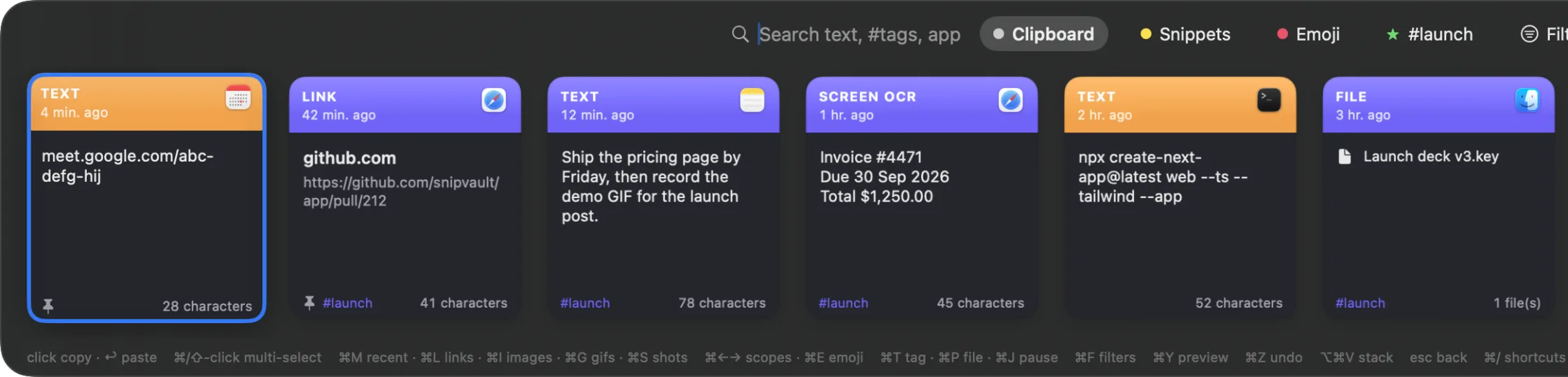
A clipboard manager is a small app that runs in the menu bar and watches the pasteboard. Each time you copy, it saves a card in its own history. You open the history with a keyboard shortcut, find the item you want, and paste it back.
SnipVault is the clipboard manager we make, and here is how the same task looks with it:
- Install SnipVault and grant Accessibility permission when asked. It needs that permission to paste into the app you were in; it never logs keystrokes.
- Copy anything, as you always have.
- Press ⇧⌘V over any app. A palette floats up with everything you have copied, newest first. Type a word to search the full text of your history, press ⏎, and the item pastes where your cursor was.
- Press ⌘1 through ⌘9 to paste a recent card without opening the palette at all.
Nothing ages out unless you tell it to. Items you reuse can be pinned to a board or tagged. Because the vault is a normal database on your Mac, everything is searchable, including the text inside screenshots SnipVault has read with OCR.
On privacy: SnipVault ignores password managers by default, never stores content that apps mark as concealed, and automatically expires copied one-time codes and card numbers after 60 seconds. It runs on macOS 13 Ventura or later, so it also brings clipboard history to Macs that cannot run Tahoe.
The clipboard is a system service with no window of its own. To see the current item, open the Finder and choose Edit, then Show Clipboard. On macOS 26 Tahoe, press ⌘Space and then ⌘4 to see a history of recent items in Spotlight.
On macOS 26 Tahoe, turn on Results from Clipboard in System Settings under Spotlight, then press ⌘Space followed by ⌘4. On macOS 15 and earlier there is no built-in history; install a clipboard manager such as SnipVault, Maccy, or Paste.
Spotlight's clipboard history keeps items for 30 minutes, 8 hours, or 7 days, whichever you choose in System Settings. Without Tahoe, the Mac keeps only the last item copied until you copy something else.
Not with the built-in clipboard on macOS 15 or earlier. On Tahoe, open the Spotlight clipboard with ⌘Space then ⌘4 and it should still be in the list if it is inside your retention window. A clipboard manager that was running at the time will have it regardless of age.
Spotlight's clipboard history stays on the Mac. Universal Clipboard moves a single item between devices for about two minutes. Some clipboard managers sync history through iCloud; check how each app treats passwords and other secrets before turning that on.