
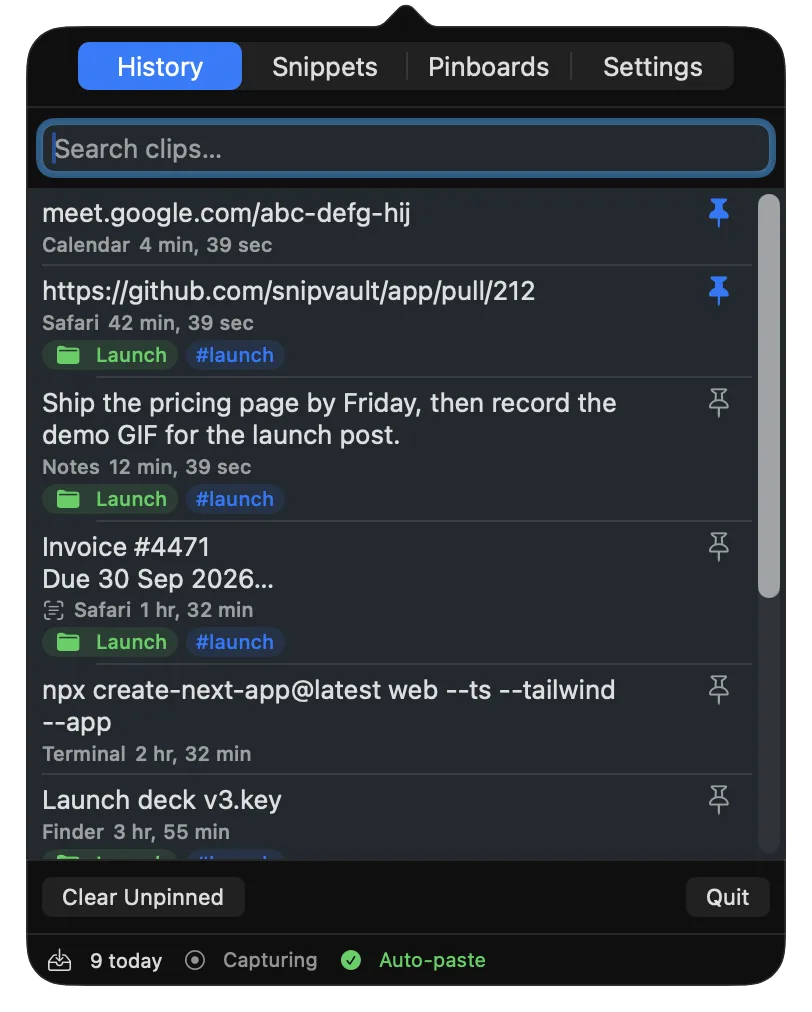
A clipboard manager keeps a history of everything you copy so you can find it again, reuse it, and organise the bits you paste every day. macOS 26 Tahoe now ships a small one inside Spotlight, which changes the question from "do I need one?" to "is the built-in one enough?"
We make SnipVault, one of the apps below, so read our verdict with that in mind. Everything else here, from prices to limits, was checked against each vendor's site and App Store listing on 4 September 2026, and we have tried to be as fair to the others as we would want them to be to us.
What actually matters in a clipboard manager
Most roundups compare feature lists. After using nearly every app on this list, five things decide whether you keep one installed:
- How long it remembers. Some apps cap history at 999 items or three months. The item you need is usually older than you expect.
- How fast you can find it. Keyboard-first search across the full text of every item beats scrolling thumbnails.
- What it refuses to remember. Your clipboard carries passwords, one-time codes, and card numbers. A good manager ignores password managers and expires secrets on its own.
- Where the data lives. On your Mac, in your own iCloud, or on a vendor's server. Each is fine as long as you know which.
- What it costs over three years. A $10 one-time app, a $30-a-year subscription, and a $80 lifetime licence look very different by year three.
Which clipboard managers are worth considering?
macOS Tahoe's Spotlight clipboard
Price: free with macOS 26. Platforms: Mac only.
Press ⌘Space, then ⌘4, and Spotlight shows your recent copies. Turn it on under System Settings, Spotlight, Results from Clipboard, and pick a retention window of 30 minutes, 8 hours, or 7 days.
Best for: anyone who only ever needs the last few things they copied today.
Trade-offs: everything is discarded after at most 7 days, there is no pinning or organising, and it does not exist on macOS 15 or earlier. It is one list, not a library.
Maccy
Price: free and open source on GitHub, or $9.99 on the Mac App Store. Platforms: Mac (macOS 14 or later).
Maccy is the clipboard manager most people should try first if they want something free. It is keyboard-driven, fast, and does one job: a searchable list of recent copies with pinning and plain-text paste. Version 2.7 added copying text out of image previews.
Best for: developers and writers who mostly copy text and want a free, no-account tool.
Trade-offs: history caps at 999 items, there is no sync between Macs (a long-standing open request), no collections or snippets, and users have reported memory use climbing past 1 GB with large image histories.
Raycast
Price: free tier; Pro is $8 per month billed annually. Platforms: Mac and Windows.
Raycast is a launcher with a good clipboard history bolted on. On the free plan history is kept for three months; Pro removes the limit. It also has snippets and can search text inside screenshots, so it is the closest free bundle to what SnipVault does.
Best for: people who already live in Raycast and want one tool for launching, snippets, and clipboard.
Trade-offs: clipboard history never syncs between Macs by design, the three-month limit on the free plan is a real ceiling, and a January 2026 GitHub issue reports it missing a fraction of copies. Pro is about $96 a year, more than any dedicated clipboard manager here. We wrote a separate guide to Raycast's clipboard history.
Alfred
Price: the Powerpack licence, £34 single or £59 with lifetime upgrades. Clipboard history requires Powerpack. Platforms: Mac only.
Alfred's clipboard history is mature, fast, and pairs with its snippets feature. You pick a retention window of 24 hours, 7 days, 1 month, or 3 months.
Best for: long-time Alfred users who already own the Powerpack.
Trade-offs: three months is the maximum retention, history does not sync between Macs (the developers have said it will not, for privacy and data-volume reasons), and buying Alfred just for the clipboard is the expensive way to get one.
Paste
Price: $2.49 a month, $29.99 a year, or $89.99 lifetime direct; $3.99 a month on the App Store. Platforms: Mac (macOS 14 or later), iPhone, iPad, Apple Vision.
Paste is the most polished clipboard manager on the Mac, with big visual previews, Pinboards, iCloud sync to iPhone and iPad, shared pinboards for teams, and a Power Search that reads text inside copied images. If you want your clipboard on your phone, Paste is the strongest choice.
Best for: people who work across Mac and iPhone and like a mouse-friendly, visual interface.
Trade-offs: it is the most expensive subscription in the category, its 2020 switch from a one-time purchase to a subscription is still the loudest complaint in its reviews, and it has no text expansion. We compare it feature by feature in SnipVault vs Paste.
Pastebot 3
Price: $39 one-time including a year of updates, then $19 a year if you want more updates; or $2.99 a month and $24.99 a year on the App Store. Platforms: Mac only, and it requires macOS 26 Tahoe.
Tapbots relaunched Pastebot in July 2026 with rule-based Smart Pastebins, text filters that transform what you paste, a paste stack, and a command-line tool. It is the power user's clipboard manager.
Best for: people who want to run regex rules and shell filters on what they paste.
Trade-offs: Tahoe-only means anyone on an older Mac is out, there is no iPhone app, and the update fee reads as a subscription to many buyers. No OCR, no expansion.
PastePal
Price: free, with a $14.99 one-time Pro unlock for Mac and iOS. Platforms: Mac, iPhone, iPad.
PastePal is the value pick if you want iPhone sync without a subscription. It has collections, a paste stack, OCR on images, and an iOS keyboard.
Best for: Mac and iPhone users who refuse to subscribe.
Trade-offs: iCloud sync is its weak point, with recent App Store reviews and open GitHub issues about items not syncing or the app quitting. Check that it is being maintained before you commit.
Copy 'Em
Price: $8.99 on the Mac App Store (a sale price at time of writing); iOS sync costs $19.99 a year. Platforms: Mac (macOS 14.5 or later), iPhone.
Copy 'Em is an older, dense, very capable manager with batch paste, 36 paste shortcuts, and text transforms.
Best for: people who want maximum control for a one-time price and do not mind a busy interface.
Trade-offs: dated interface, no OCR or snippets built in, and reviewers worry about how active development is.
SnipVault
Price: $2.49 a month, $29.99 a year, or $79 once, with a 7-day trial and no card. Platforms: Mac (macOS 13 or later, Intel and Apple Silicon).
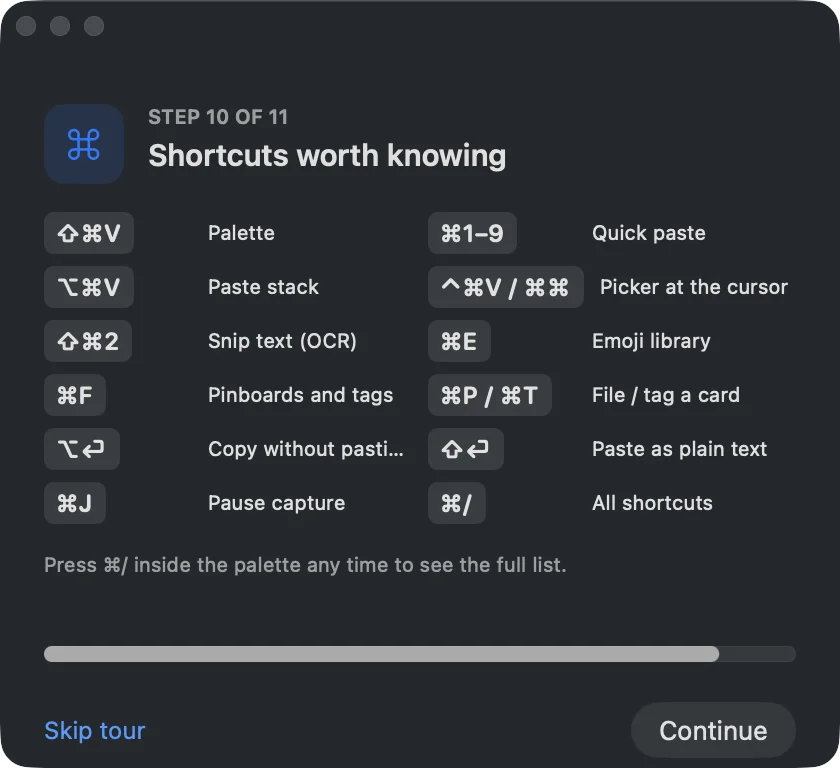
SnipVault is our app. It keeps an unlimited, full-text-searchable history of text, links, images, files, colours, and GIFs, and adds two things no other app on this list bundles: screenshot OCR that keeps both the text and the image in the vault, and snippet expansion with placeholders that fire in any app. Press ⇧⌘V to search and paste, ⇧⌘2 to snip text off anything on screen.
On privacy, it ignores password managers, never stores content apps mark as concealed, and auto-expires copied one-time codes and card numbers after 60 seconds. The vault stays on your Mac.
Best for: people who would otherwise run Paste, TextSniper, and TextExpander side by side, and want to pay once.
Trade-offs: there is no iPhone app, sync between Macs is limited to the iCloud-entitled build, and it is younger than everything else on this list.
Comparison at a glance
| App | Price | History limit | Sync | OCR | Snippets | Ignores secrets |
|---|---|---|---|---|---|---|
| Tahoe Spotlight | Free | 7 days max | No | No | No | Partly |
| Maccy | Free / $9.99 | 999 items | No | Partial | No | Yes |
| Raycast | Free / $96 per yr | 3 months (free) | No | Yes | Yes | Yes |
| Alfred | £34 once | 3 months | No | No | Yes | Yes |
| Paste | $29.99 per yr / $89.99 once | Unlimited | Mac, iPhone, iPad | In search | No | Yes |
| Pastebot 3 | $39 + $19 per yr | ~1,500 items | Mac to Mac | No | No | Yes |
| PastePal | Free / $14.99 once | Unlimited | Mac, iPhone | Yes | No | Yes |
| Copy 'Em | $8.99 once | Unlimited | iPhone ($19.99 per yr) | No | No | Yes |
| SnipVault | $29.99 per yr / $79 once | Unlimited | Mac to Mac (iCloud build) | Yes, with history | Yes | Yes, with auto-expiry |
Prices checked 4 September 2026. Corrections to diljit@dprsoftwarelabs.com.
Our verdict
- If you want free: start with the Tahoe Spotlight clipboard if you have macOS 26, and add Maccy the first time 7 days is not long enough.
- If you need your clipboard on your iPhone: Paste if you will subscribe, PastePal if you will not.
- If you already use Raycast or Alfred: their clipboard histories are good enough that a separate app has to earn its place.
- If you want history, screenshot OCR, and snippets from one app, paid once: that is why we built SnipVault. Try it free for 7 days and keep the app you are switching from running alongside it until you are sure.
macOS 26 Tahoe does, inside Spotlight: press ⌘Space and then ⌘4. It keeps items for 30 minutes, 8 hours, or 7 days. macOS 15 and earlier keep only the last item copied.
Maccy, which is free and open source, is the best-known free option and has been maintained for years. Raycast's free plan is the best free option if you also want snippets, with a three-month history limit.
They can be, if the app ignores password managers and content flagged as concealed, and if it expires one-time codes. Every paid app in this list does the first two; SnipVault also auto-expires codes and card numbers after 60 seconds. Avoid any manager that syncs your history to a server you do not control.
Maccy (macOS 14 or later), Paste (macOS 14 or later), Alfred, Raycast, Copy 'Em, PastePal, and SnipVault (macOS 13 or later) all run on Intel. Pastebot 3 requires macOS 26, which excludes most Intel Macs.
Try the Spotlight clipboard for a week. If you never wish you could find something older than seven days, pin an item, or search by a word inside a screenshot, you do not need one.