
The clipboard manager for Mac
that also reads your screen.
Everything you copy, one keystroke away. SnipVault keeps a searchable history of your clipboard, snips text off any screenshot with on-device OCR, and expands snippets as you type.
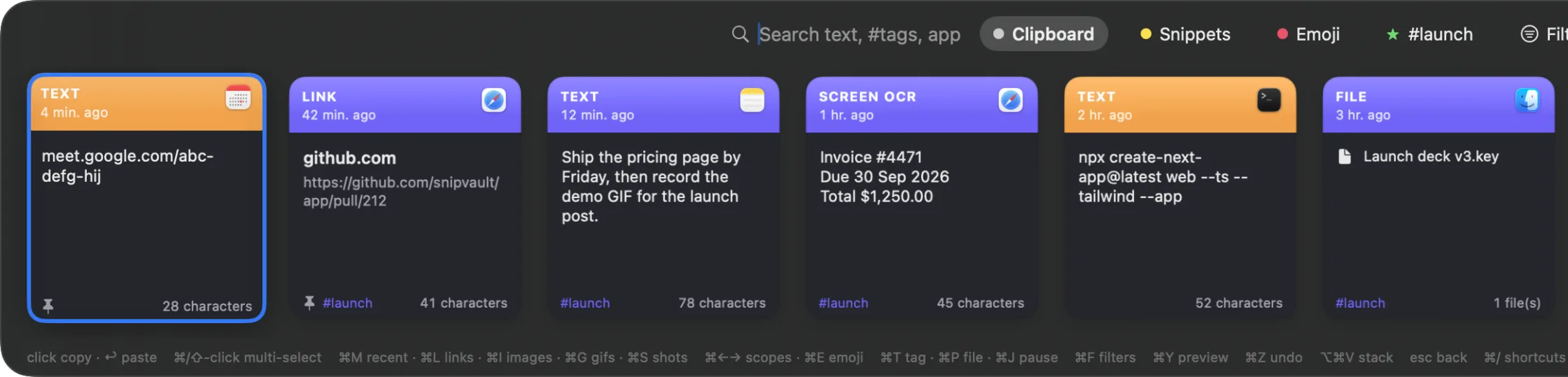
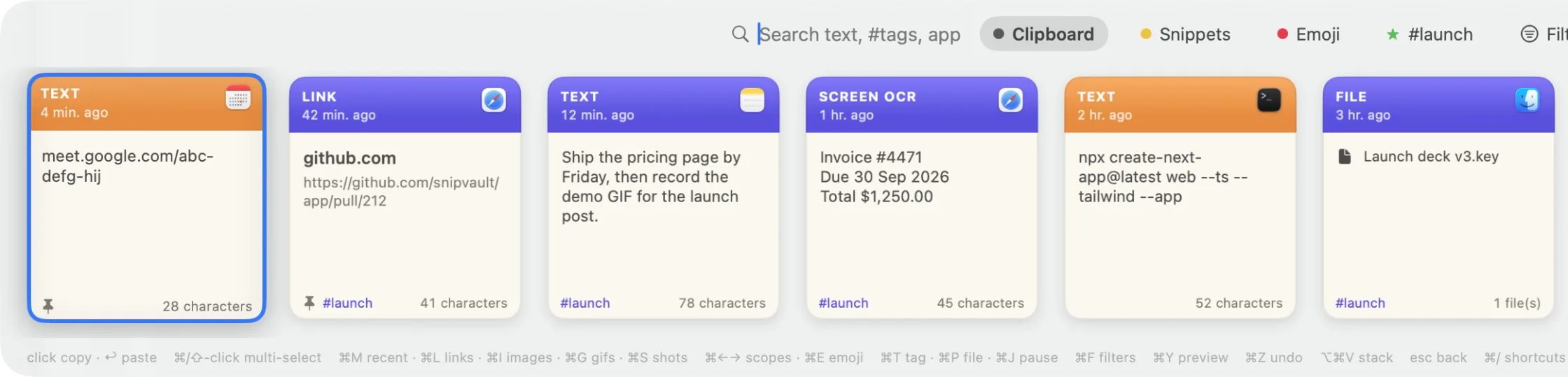
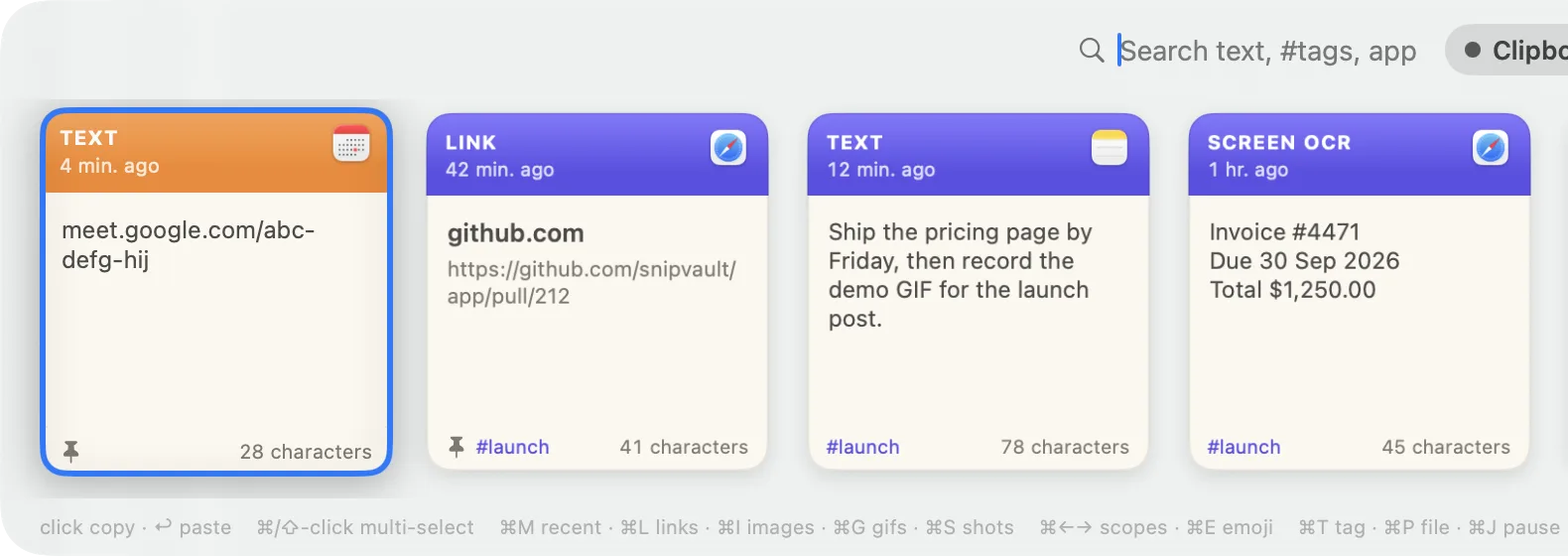
Real screenshot. Press ⇧⌘V and the palette floats over whatever you are doing.
More than a clipboard
Three tools most people run side by side, plus your browser bookmarks, emoji and GIFs, folded into one keyboard-first palette.
Clipboard history
Nothing you copy is ever lost
Text, links, images, files, colours, even GIFs land in a searchable vault the moment you press ⌘C. Press ⇧⌘V over any app, type a word, hit ⏎ and it pastes right where you were.
- ●Unlimited history, full-text search
- ●⌘1–9 pastes a recent card instantly
- ●⌥⏎ copies without pasting, ⇧⏎ pastes plain text
Screenshot OCR
Snip text off anything on screen
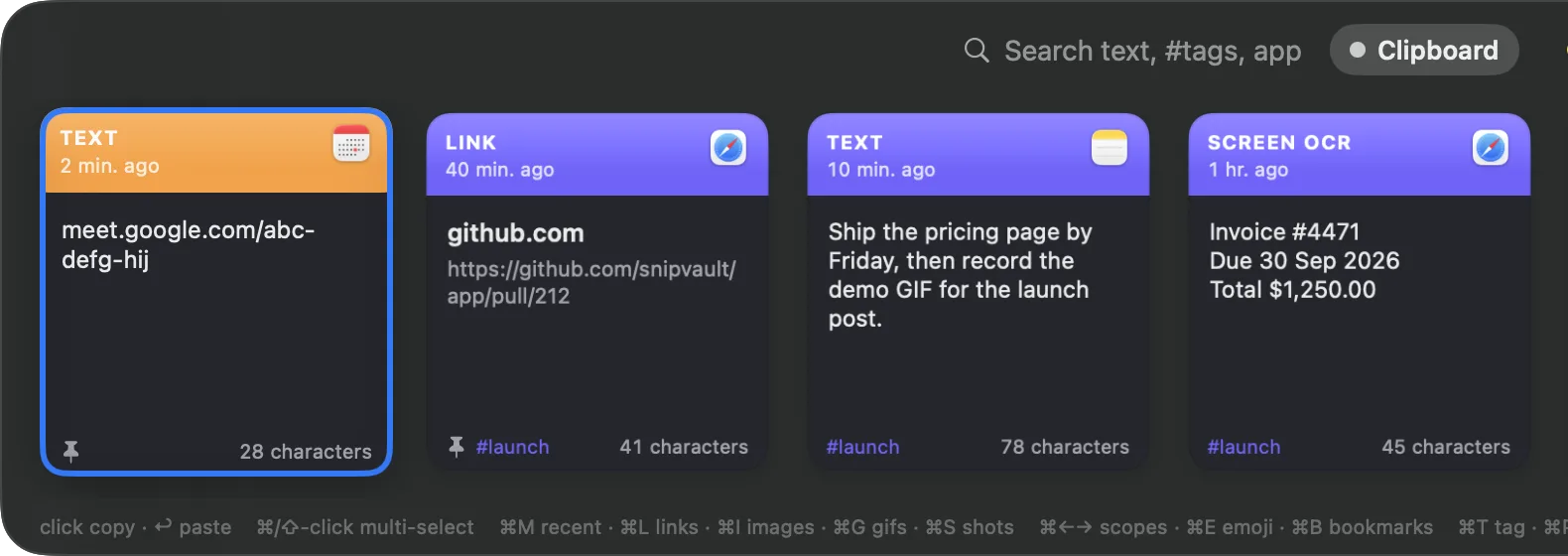
A frame in a video, a scanned PDF, an error in a screenshot, a slide on a Zoom call. Press ⇧⌘2, drag, and the text is on your clipboard. The screenshot and its text stay in the vault, searchable for good.
- ●On-device Apple Vision, nothing leaves your Mac
- ●Reads video frames, PDFs, and app windows where Live Text has no reach
- ●QR codes decode straight to text
invoice-4471.pdf · page 1 of 2
Due 30 Sep 2026
Total $1,250.00
Drag over any region, even inside a video or a locked PDF.
Due 30 Sep 2026
Total $1,250.00
Snippets
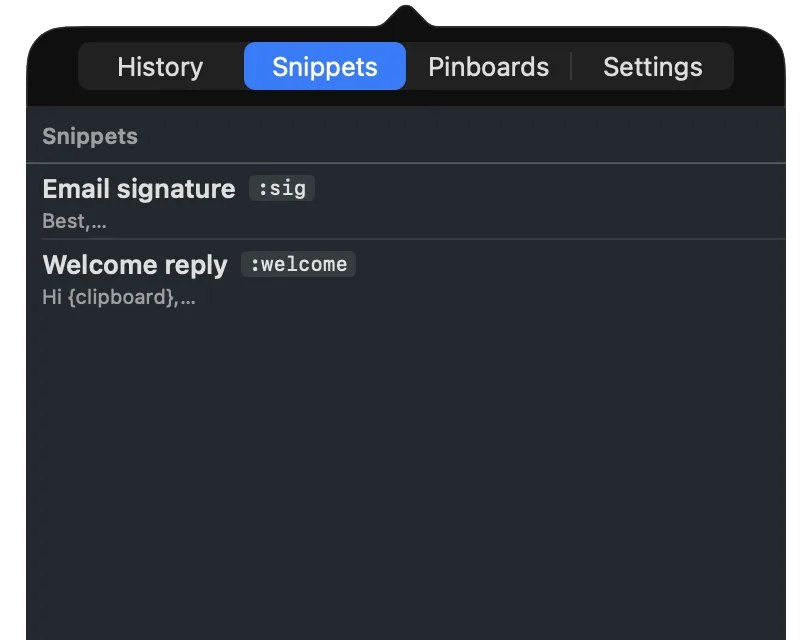
Type :sig and it becomes your signature
Save any clip as a snippet with a :keyword. Type it in Mail, Slack, a terminal, or a browser form and it expands inline, with placeholders filled at paste time.
- ●{date}, {clipboard}, {cursor}, {vault offset=1}
- ●Pipe modifiers: {clipboard | trim | uppercase}
- ●Imports Raycast, Espanso, and TextExpander libraries
Pinboards and tags
Keep what you reuse close
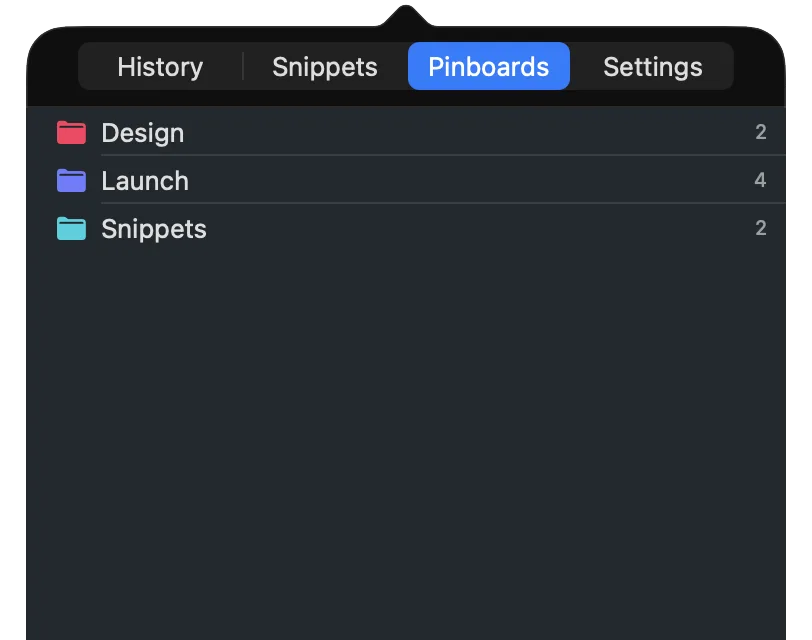
File clips into nested pinboards, tag them, and jump straight to a board from the palette. ⌘F opens an explorer over the whole vault, by pinboard, tag, type, or source app.
- ●Nested pinboards with colours
- ●#tags across history, snippets, and captures
- ●Paste stack: queue several clips and paste them in order
Browser bookmarks
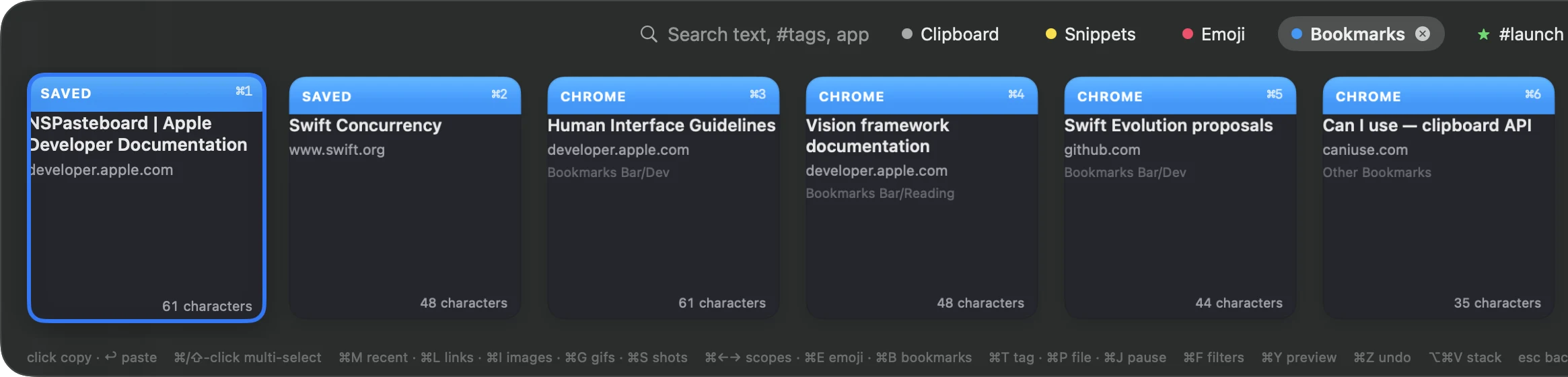
Your Chrome and Firefox bookmarks, in the same palette
Press ⌘B and every bookmark you have saved in Chrome or Firefox is there, searchable by title, site, or folder. Hit ⏎ and the page opens in the tab you are already looking at, rather than piling up another one.
- ●Read live from both browsers, across every profile — nothing is copied or synced anywhere
- ●⌃⌘B saves the page you are on, so a page can live here without cluttering your browser
- ●Bookmarked in Chrome, opened in Firefox, or the other way round
Emoji and GIFs
Emoji by name, GIFs that stay animated
Press ⌘E in the palette, type “tada” or “ship”, hit ⏎ and the emoji lands at your cursor. Copy a GIF anywhere and it is kept as a real animated GIF, filtered with ⌘G and pasted back still moving.
- ●⌘E: 450+ emojis searchable by name and keyword, no cloud lookup
- ●⌘G shows only GIFs; ⌘I images, ⌘L links, ⌘S screenshots
- ●GIF files copied in Finder are captured as GIFs, not file paths
⏎ inserts at your cursor
Your clipboard stays on your Mac
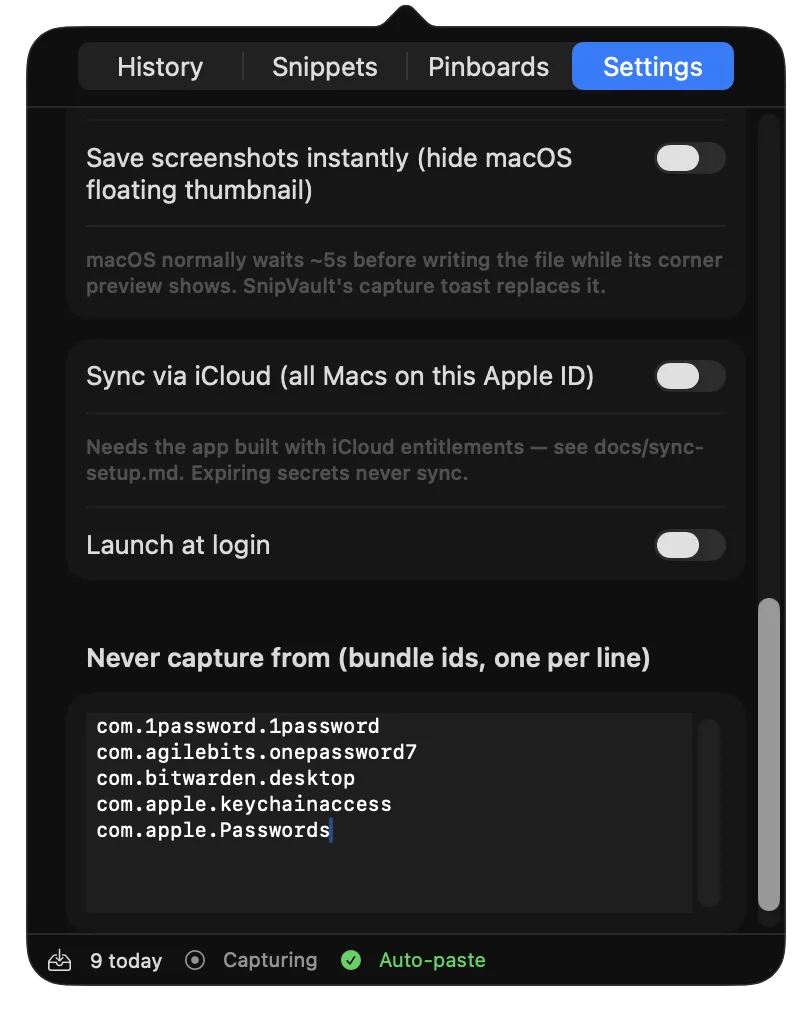
No account. No servers. A local SQLite vault you can copy, back up, or delete. Sync, when you turn it on, goes through your own iCloud, and secrets never sync at all.
- ✓Password managers are never captured. 1Password, Bitwarden, Keychain, and Apple Passwords are on the ignore list from the first launch.
- ✓Copied codes self-destruct. One-time passcodes and card numbers expire from the vault 60 seconds after you copy them.
- ✓Invisible on calls. Every SnipVault panel is hidden from screen sharing and recordings.
- ✓Honest about permissions. One permission, Accessibility, so ⏎ can press ⌘V for you. No keystroke logging, ever.
Copy less. Paste more.
Developers
Error messages off a screenshot into a search. Commit hashes, tokens, and one-liners three copies ago. Snippets for the same shell incantations, in any terminal.
Designers
Hex codes, asset links, and copy from mockups in one palette. Grab text off a Figma frame or a competitor's screenshot without retyping.
Writers
That paragraph you cut and forgot. Quotes snipped from PDFs with the page kept alongside. Boilerplate that expands as you type.
Support and sales
Reply templates with the customer's name filled from the clipboard. Order numbers read off screenshots. A paste stack for filling the same form all day.
Every plan has every feature
No feature gates, no add-ons. Here is the whole list.
Capture
- Text, rich links with titles, images, files, colours, GIFs
- Screenshot OCR with the image kept
- Watches your Screenshots folder
- Terminal copy-on-select gate
- ⌘J pauses capture
- Live capture counter
Paste
- ⇧⌘V floating palette
- ⌘1–9 quick paste
- ⌃⌘V caret picker at your cursor
- ⌘⌘ double-tap to open
- ⌥⌘V paste stack
- Multi-select and paste several
Organise
- Nested pinboards with colours
- Chrome and Firefox bookmarks in ⌘B
- Tags and ⌘F explorer
- Type and source-app filters
- Edit, rename, undo delete
- Export and import your vault as a .snipvault file
- Quick preview with ⌘Y
Expand
- Snippets with :keywords
- Placeholders and date math
- Pipe modifiers
- Built-in emoji library (⌘E)
- Importers for Raycast, Espanso, TextExpander
- Longest keyword wins
Privacy
- Password managers ignored by default
- Concealed content never stored
- OTP and card numbers expire in 60 s
- Hidden from screen sharing
- Local SQLite vault, no account
- Secure Input detection names the app
Comfort
- Light, dark, and accent themes
- Launch at login
- Menu-bar only, no Dock icon
- Remappable shortcuts
- Onboarding that explains one permission
- macOS 13+, Intel and Apple Silicon
Every shortcut, on one screen
Learn five and you are fast. Press ⌘/ inside the palette for this list any time. All of them are remappable.
Anywhere
- Open the palette⇧⌘V
- Snip text off the screen (OCR)⇧⌘2
- Paste the next item from the stack⌥⌘V
- Picker at your cursor⌃⌘V or ⌘⌘
- Bookmark the page you are on⌃⌘B
- Expand a snippet inline:keyword␣
In the palette
- Search everything, #tags, appstype
- Paste into the app you came from⏎
- Copy without pasting⌥⏎
- Paste as plain text⇧⏎
- Quick-paste the Nth card⌘1–9
- Quick-preview a card⌘Y
- Open a link or file in its app⌘O
Filters
- Emoji library⌘E
- Bookmarks⌘B
- GIFs only⌘G
- Images only⌘I
- Links only⌘L
- Screenshots only⌘S
- Most recent, filters cleared⌘M
- Cycle scopes⌘← → · ⇥
Organise
- Pinboards and tags explorer⌘F
- File the card into a pinboard⌘P
- Tag the card⌘T
- Jump to your most-used tag⌘⇧T
- Multi-select cards⌘A · ⇧←→
- Delete, undo delete⌦ · ⌘Z
- Pause or resume capture⌘J
- Show every shortcut⌘/
Light or dark, it matches your Mac
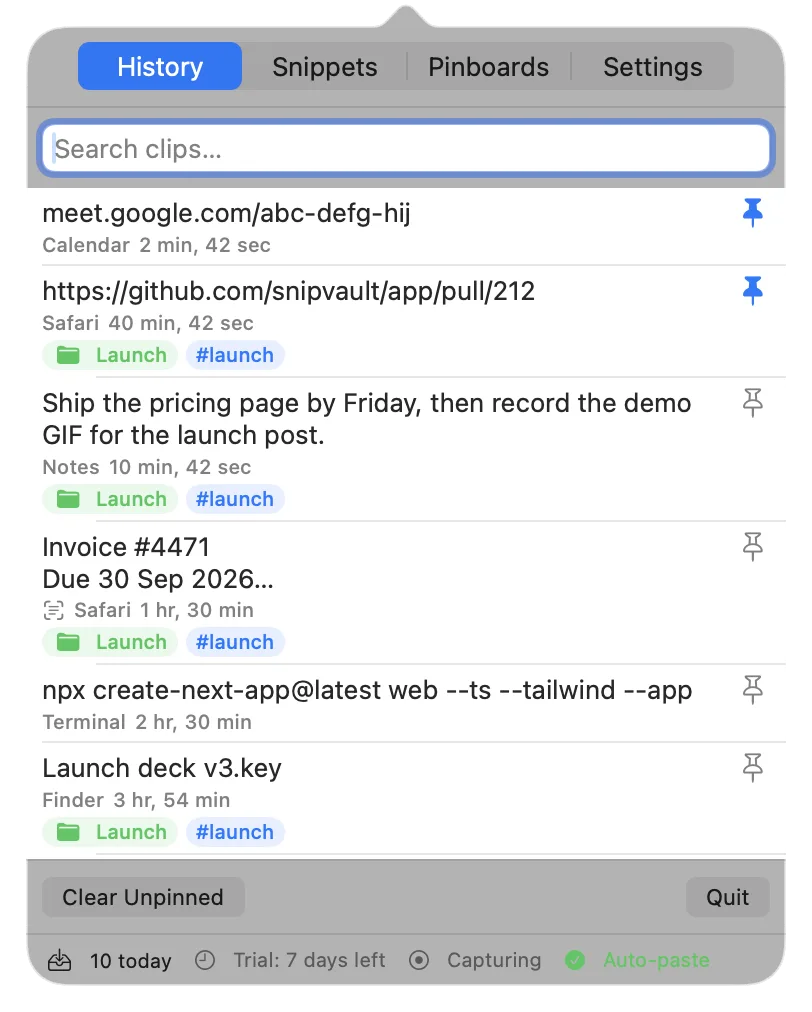
No Dock icon, no window to manage. The menu-bar view shows your history, snippets, pinboards, and settings, with a status line that tells you capture is alive and auto-paste is ready.
See what you gain
Feature-by-feature comparisons with the apps you already know. Prices checked against vendor sites in September 2026.
| App | Clipboard | OCR | Snippets | Price |
|---|---|---|---|---|
| SnipVault | ✓ unlimited | ✓ kept in vault | ✓ inline | $29.99/yr or $79 once |
| Paste | ✓ | partial | — | $29.99/yr or $89.99 once |
| TextSniper | — | ✓ | — | $7.99 once |
| TextExpander | — | — | ✓ | $60/user/yr |
| Raycast | ✓ | ✓ | ✓ | Free · Pro $8/mo |
| Maccy | ✓ | partial | — | Free (open source) |
| CleanShot X | — | ✓ | — | $35 + $19/yr updates |
Simple pricing. Pay once if you prefer.
Every plan starts with a 7-day free trial. No credit card required.
Personal Annual
$29.99 per year
About $2.50/month, billed once a year. Our most popular plan.
Subscribe yearlyTeams of 3+? Ask about volume pricing →
New to clipboard managers?
Start with how the Mac clipboard actually works, then decide whether you need more.
Guides
Flycut stopped working on your Mac? Why, and what to use instead (2026)
Flycut's last release was December 2020. What breaks on Sonoma, Sequoia, and Tahoe, two things to try before giving up, and the clipboard managers that replace it.
· 4 min read
Guides
CopyClip for Mac: what it keeps, where it stops, what to use next
Two CopyClips share the Mac App Store. What CopyClip 2 does for $7.99, its text-only and 9,999-clip limits, common complaints, and the apps to move to.
· 4 min read
Guides
Text replacement on Mac: built-in vs a text expander
Set up macOS text replacements, learn why they fail in Chrome, Slack, and Terminal, and when a text expander with placeholders is the better tool.
· 5 min read
What is SnipVault?+
SnipVault is a macOS app that captures everything you copy or screenshot into a searchable vault and pastes it into any app. It combines a clipboard manager, screenshot OCR (text recognition), and a snippet expander, so one app replaces Paste, TextSniper, and TextExpander.
How is SnipVault different from Paste?+
Paste is a clipboard manager. SnipVault does clipboard history too, but it also snips and reads text off your screen with on-device OCR and expands text snippets as you type. It is three tools in one, with privacy features like automatic expiry of copied OTP codes and card numbers.
Does SnipVault do screenshot OCR?+
Yes. Press ⇧⌘2 to select any region of the screen. SnipVault reads the text with Apple's on-device Vision engine, puts it on your clipboard, and keeps both the text and the screenshot in your searchable vault.
Can I create text snippets and keyboard shortcuts?+
Yes. Save reusable text as snippets with a :keyword and placeholders such as {date}, {clipboard}, and {cursor}. Type the keyword in any app and SnipVault expands it inline, TextExpander-style.
Can SnipVault open my browser bookmarks?+
Yes. Press ⌘B in the palette and your Chrome and Firefox bookmarks are there, across every profile, searchable by title, site, or folder. Press ⏎ and the page opens in the tab you are already in rather than a new one. ⌃⌘B saves the page you are on into SnipVault. Bookmarks are read live from the browsers and never copied or uploaded, and Safari is not supported because reading its bookmarks would require Full Disk Access.
Is my clipboard data private?+
Yes. Content marked as concealed by password managers is never stored, password-manager apps are ignored by default, and copied one-time codes and card numbers auto-expire after 60 seconds. Your vault stays on your Mac.
Does SnipVault sync across devices?+
Between Macs, through your own iCloud account, in the iCloud-entitled build. There is no SnipVault server and no iPhone or iPad app. Secrets such as one-time codes and card numbers never sync, and you can also move a vault between Macs with the export and import feature.
Does macOS have a built-in clipboard manager?+
Only a small one. macOS 26 Tahoe added a clipboard history to Spotlight (press ⌘Space, then ⌘4) that keeps items for 30 minutes, 8 hours, or 7 days and then discards them. Older versions of macOS keep only the last thing you copied. SnipVault keeps everything, searchable, for as long as you want.
What do I need to run SnipVault?+
SnipVault runs on macOS 13 (Ventura) or later, on both Apple Silicon and Intel Macs.
How much does SnipVault cost?+
SnipVault Personal is $2.49 per month or $29.99 per year, with a one-time Lifetime option at $79. Every plan starts with a free 7-day trial and no credit card is required to try it.
Your turn
Anything to share about SnipVault?
Comments, feedback and feature requests all go in one place. Say what is missing and it goes on the list — a lot of what is in the app now started as somebody’s request.
One app for your clipboard, your screen, and your snippets.